Updated 20 August 2026
Quick Answer
Music school scheduling software manages lesson calendars, student timetables, availability windows, and group session scheduling in a single system, replacing text-based arrangements with a self-managing timetable for music teachers and multi-teacher schools.
What is Music School Scheduling Software?
Scheduling software for music teachers eliminates the cognitive load of managing a week's lesson slots across 20 students at different times, different instruments, and different stages.
- ✓ Shows real-time lesson availability by instrument, teacher, and slot length
- ✓ Students book and reschedule within your defined availability windows
- ✓ Individual and group lessons managed in the same timetable
- ✓ Automatic WhatsApp reminders before every lesson
- ✓ Multi-teacher music schools supported with separate staff calendars
Good scheduling software means your teaching week is structured, your students are always prepared, and your calendar fills and manages itself.
The problems music school scheduling software solves
Manual workarounds that cost music lessons businesses hours every week.
20 students requiring individual time slot negotiations every week
Agreeing lesson times individually, remembering who changed, and managing mid-week rescheduling requests is an exhausting overhead for a solo teacher.
Group lesson timetable clashing with individual lesson slots
Without a unified calendar, individual lessons and group sessions can end up in the same slot. A shared timetable system prevents scheduling conflicts permanently.
Students arriving for the wrong lesson time because a change wasn't communicated
A time change communicated by text gets lost in a conversation history. WhatsApp notifications sent from the system reach every student with the updated details.
Multi-teacher school with no shared visibility of overall capacity
Without a scheduling system, a music school director doesn't know how many unfilled slots each teacher has or where new student demand can be accommodated.
How Bizzly works
From sign-up to your first paid booking in under 15 minutes.
Choose your industry Launch Pack
Pick the pre-configured template for your industry. Subscription plans, booking calendar, and Stripe payments are already set up, just add your services and rates.
Customer pays first, then books
A customer subscribes or buys a session pack. Stripe processes the payment. Bizzly creates their quota. They can now book sessions up to their limit.
Calendar enforces quota automatically
The booking calendar only shows slots to customers who have available quota. No double-bookings, no unpaid slots, no manual checking, the system handles it.
Setup guides: Choosing a launch packCreating your servicesPicking a booking modeConnecting Stripe
How Bizzly handles music school scheduling software
Purpose-built features for music lessons businesses — not bolted-on workarounds.
Instrument-specific availability configuration
Set your available hours per day, with different availability for different instruments or lesson lengths. Students only see slots relevant to their lesson type.
Instrument-specific schedulesSelf-service student rescheduling
Students reschedule by cancelling and rebooking from the portal within your cancellation window. Freed slots open immediately. You receive a notification. Zero rescheduling messages.
Zero reschedule adminGroup and individual lesson coexistence
Theory classes, group sessions, and 1:1 lessons all appear in the same timetable. A slot occupied by a group session blocks individual bookings for that time automatically.
Unified lesson calendarWhatsApp lesson reminders
Students receive a WhatsApp reminder 24 hours before every lesson, time, location, and (for online) their Google Meet link. Parental reminders for younger students delivered to the parent account.
Automated lesson remindersSee it in action
Music School Scheduling Software on a live Bizzly site
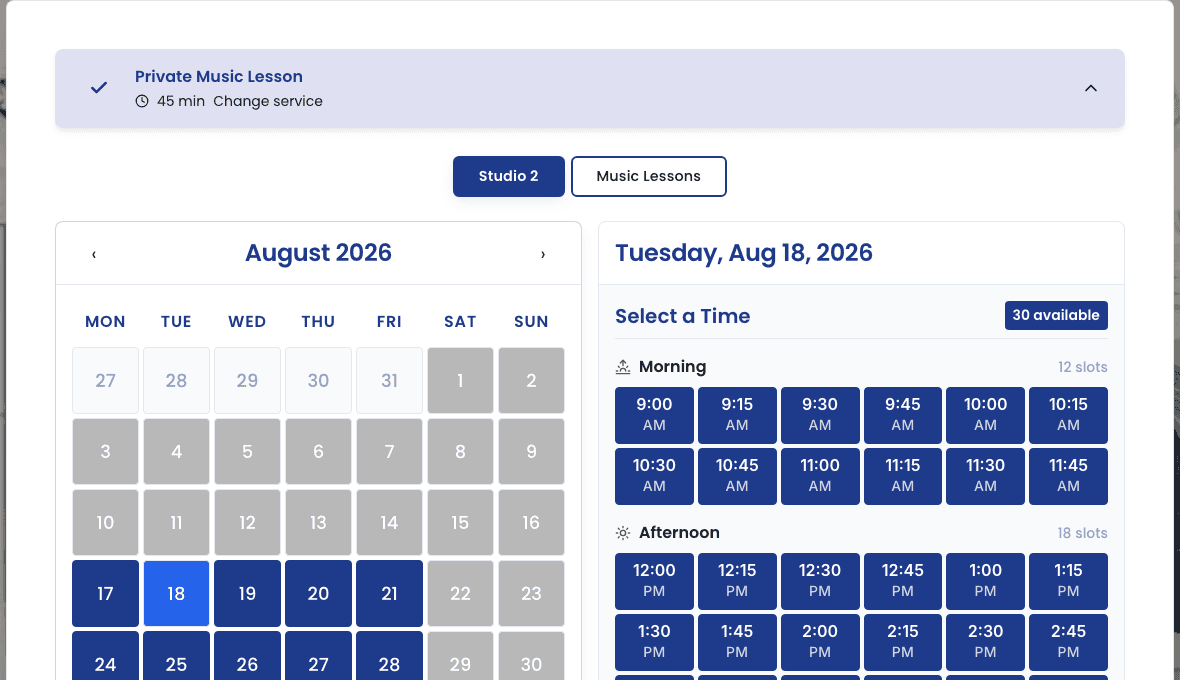
Lesson booking on a live Bizzly music school site — real 15-minute slots, real availability, not a mockup.
Real-world use cases
How music school scheduling software works in practice.
Solo piano teacher with 18 students at different levels
Each student sees only the slots matching their lesson length (30 or 60 min). They book, reschedule, and manage their lesson independently. The teacher sees the full timetable in one view.
Music school with 4 teachers across 3 instruments
Each teacher has their own calendar. New students choose their preferred teacher or instrument and see that teacher's availability. Admin sees all 4 teachers' fill rates in the dashboard.
Grade exam season intensity schedule
Two weeks before the exam period, shift to 45-minute lesson slots (up from 30 minutes) for graded students. The schedule adapts; non-graded students see their standard availability.
Half-term make-up lesson scheduling
Students who missed a lesson during term use their credit to book a make-up slot in the half-term schedule. Available slots are visible in the portal. No contact needed.
Music School Scheduling Software — how Bizzly compares
| Feature | Wix | WordPress + plugins | Acuity Scheduling | Tutorbird | Bizzly |
|---|---|---|---|---|---|
| Subscription / session packs | Plugins needed | Limited | Automated | ||
| Quota-enforced booking | Limited | Built-in | |||
| Custom website included | Build yourself | Included | |||
| WhatsApp AI agent | Included | ||||
| Client CRM | Basic | Plugins needed | Basic | Full CRM | |
| Invoice / payment automation | Plugins needed | Manual | Automated | ||
| Setup time | Days | Weeks | Hours | Days | 15 minutes |
What Bizzly costs
Flat monthly pricing for the whole platform — website, bookings, payments, and client management included. No per-booking fees from Bizzly; only standard Stripe processing.
core booking calendar, Stripe payments, unified basket and assisted checkout, term enrolment, attendance registers, 1 staff calendar
WhatsApp AI assistant, free trial sessions, waitlists, recurring appointments, SMS notifications, 3 staff calendars
unlimited bookings and calendars, custom domain, merch store, per-venue pricing, priority support with live chat
14-day free trial · no card required · full pricing details at bizzly.net/pricing
Music School Scheduling Software — FAQs
Explore Bizzly for Music Lessons
More Bizzly tools for music lessons
Bizzly is music lessons software for service businesses in the UK and worldwide: an all-in-one, multi-currency platform covering subscriptions, bookings, payments, scheduling, and client management. Often used as an alternative to Wix, WordPress + plugins, Acuity Scheduling, Tutorbird.
Ready to set up your music school scheduling software?
Join music lessons businesses using Bizzly to automate payments, bookings, and client management. 14-day free trial — no card required.